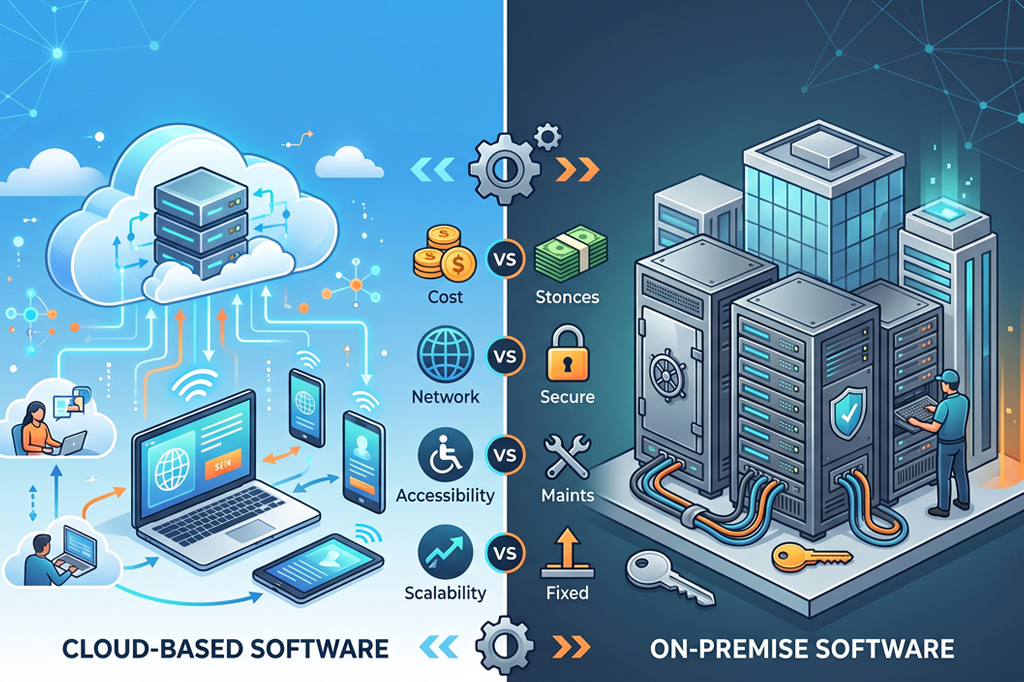
Technology has become the backbone of modern businesses. Whether you’re managing customer relationships, handling finances, tracking projects, or running daily operations, choosing the right software can improve efficiency and support business growth. One of the biggest decisions companies face is whether to choose cloud-based software or on-premise software.
Both options offer unique advantages, but the right choice depends on your budget, security needs, business size, and IT resources. Understanding the differences between these two deployment models can help you invest in software that meets both your current and future business requirements.
What Is Cloud-Based Software?
Cloud-based software is hosted on remote servers and accessed through the internet. Instead of installing software on local computers or company servers, users simply log in through a web browser or mobile application.
Most cloud solutions follow a subscription model where businesses pay monthly or annually based on the number of users or services required.
Key Features of Cloud-Based Software
Cloud software offers several advantages that make it popular among startups and growing businesses.
- Access software from anywhere with an internet connection
- Automatic updates and maintenance
- Subscription-based pricing
- Easy collaboration for remote teams
- Quick deployment with minimal setup
- Flexible storage and computing resources
Since the software provider manages the infrastructure, businesses don’t need to invest in expensive servers or dedicated maintenance teams.
What Is On-Premise Software?
On-premise software is installed directly on a company’s own servers and computers. The organization owns the infrastructure and manages every aspect of the system, including installation, maintenance, security, and upgrades.
Many businesses in highly regulated industries still prefer on-premise solutions because they provide complete control over business data.
Key Features of On-Premise Software
Some common characteristics include:
- Software hosted within the company’s premises
- Complete ownership of business data
- High level of customization
- Works even without internet connectivity for many local applications
- Greater control over security policies
- Internal IT team manages updates and maintenance
Although on-premise software requires higher upfront investment, some organizations consider it a long-term investment because they avoid recurring subscription fees.
Cloud-Based vs On-Premise Software: Major Differences
Choosing between cloud and on-premise software involves comparing several important factors.
- Cost and Budget
Cloud-based software requires minimal upfront investment. Businesses pay a predictable monthly or yearly subscription, making it easier to manage expenses. There is no need to purchase servers, storage devices, or networking equipment.
On-premise software requires significant upfront spending on software licenses, hardware, installation, and infrastructure. Companies are also responsible for electricity, cooling systems, hardware replacement, and ongoing maintenance costs.
- Security and Data Control
Cloud providers invest heavily in enterprise-grade security, including encryption, backups, and continuous monitoring. However, business data is stored on third-party servers, which may concern organizations with strict compliance requirements.
On-premise software gives organizations complete ownership and control over their data. Companies can create custom security policies and decide exactly where sensitive information is stored.
- Maintenance and Updates
With cloud software, the service provider handles software updates, bug fixes, security patches, and server maintenance automatically.
With on-premise software, the internal IT department must perform software upgrades, maintain hardware, troubleshoot issues, and monitor security systems regularly.
- Accessibility and Scalability
One of the biggest advantages of cloud software is accessibility. Employees can securely access applications from home, office, or while traveling using laptops, tablets, or smartphones.
Cloud platforms also allow businesses to increase or decrease storage and computing resources almost instantly as business needs change.
On-premise software is generally accessed within the company’s internal network or through VPN connections. Expanding storage or adding new users often requires purchasing additional hardware, making scalability slower and more expensive.
Why More Businesses Are Moving to the Cloud
The demand for cloud computing continues to grow because businesses want flexible, cost-effective, and scalable solutions. Remote work, hybrid workplaces, and digital collaboration have increased the need for software that employees can access from anywhere.
Cloud platforms also reduce IT workload, allowing businesses to focus more on innovation and customer service instead of managing servers and infrastructure.
Deployment: How the Two Models Differ
The way software is deployed plays a major role in how businesses manage their IT environment.
- Cloud-Based Software
Cloud software is hosted by a third-party provider and delivered through the internet. Businesses simply create user accounts and start using the platform without installing complex hardware or software. This makes cloud deployment much faster and easier, especially for companies that want to get started quickly.
- On-Premise Software
On-premise software is installed on the company’s own servers and infrastructure. Businesses are responsible for setting up the hardware, installing the software, managing storage, and maintaining the entire environment. While this offers greater control, it also requires more time and technical expertise.
Compliance and Data Privacy
Many industries, including healthcare, banking, education, and government, must follow strict regulations for storing and protecting sensitive information.
With cloud software, businesses should verify that the provider complies with industry standards such as GDPR, HIPAA, ISO 27001, or SOC certifications, depending on their requirements. Choosing a trusted cloud provider helps ensure data is protected and managed according to regulatory guidelines.
On-premise software gives organizations complete responsibility for compliance. Businesses have full visibility into where data is stored and how it is protected, making it easier to meet internal security policies. However, they must also invest in maintaining compliance through regular audits, updates, and security monitoring.
Pros and Cons of Cloud-Based Software
Advantages
- Lower upfront investment
- Quick implementation
- Automatic updates and maintenance
- Easy access from anywhere
- Supports remote and hybrid work
- Flexible resource scaling
- Predictable subscription costs
Challenges
- Requires a reliable internet connection
- Recurring subscription fees
- Less direct control over server infrastructure
- Data is managed by a third-party provider
Pros and Cons of On-Premise Software
Advantages
- Complete ownership of business data
- Greater customization options
- Full control over security settings
- Can operate within internal networks without depending on cloud connectivity
- Suitable for organizations with strict compliance requirements
Challenges
- High initial investment
- Ongoing maintenance costs
- Requires experienced IT professionals
- Hardware upgrades can be expensive
- Scaling takes more time
Conclusion
Whether you choose cloud-based or on-premise software, the best solution is the one that aligns with your business goals, budget, and operational requirements. Both deployment models offer unique advantages, and understanding their differences will help you make a smarter investment that supports long-term growth.
At Company Software Reviews, we make software selection easier by providing detailed software reviews, verified user ratings, product comparisons, feature breakdowns, and pricing insights across a wide range of business software categories. Our goal is to help businesses compare solutions with confidence and choose software that delivers real value.
Instead of spending hours researching multiple websites, explore Company Software Reviews to discover trusted software recommendations, unbiased comparisons, and genuine user feedback that help you make informed business decisions.